Getting Started
Install AlphaPeel
Here is a sample guide for installing AlphaPeel as a Python package.
For more information on installing Python packages, visit Python Packaging User Guide.
Install via pip
AlphaPeel is available on PyPI
hence you can install it simply by running the following command in a terminal:
pip install AlphaPeel
Install from the git repository
You can also install AlphaPeel from the code in git repository.
Clone the repository:
git clone --recurse-submodules https://github.com/AlphaGenes/AlphaPeel.git
Change the working directory to the one holding the repository:
cd AlphaPeel
Create a virtual environment:
python -m venv AlphaPeel_env
Activate the environment:
If you are using macOS/Linux:
source AlphaPeel_env/bin/activateIf you are using Windows:
AlphaPeel-env\Scripts\activate
Upgrade pip:
python -m pip install --upgrade pip
Upgrade the build:
python -m pip install --upgrade build
Build the distributions:
Note
If you are building on a branch other than the main branch, you may need to first check if the submodule reference is correct before the build.
python -m build
Install the package by using the built wheel distribution:
python -m pip install dist/alphapeel*.whl
Run examples
Change the working directory to the one holding the example:
cd example
Run the example:
bash run_examples.sh
If you have installed R, you can check the accuracy of the example code:
Rscript check_accuracy.R
Deactivate the environment:
deactivate
Install on Eddie
Note
This section is only for the users from the University of Edinburgh.
To use AlphaPeel on the Eddie, the University of Edinburgh’s Research Compute Cluster,
you can find information to create an environment without causing the home directory to go over quota at
Eddie wiki page.
If you encountered the issue that the files show as modified directly after a git clone, you may can try:
git config core.fileMode false
An example
The following is a very simple example to demonstrate
the principle of estimating unknown haplotypes and genotypes.
The example is deliberately simplistic for the demonstration.
Note that AlphaPeel can handle much more complex examples.
The example contains two parents with known genotypes and
one progeny with unknown genotypes.
See the description on
terminology and encoding of the input data and outputs.
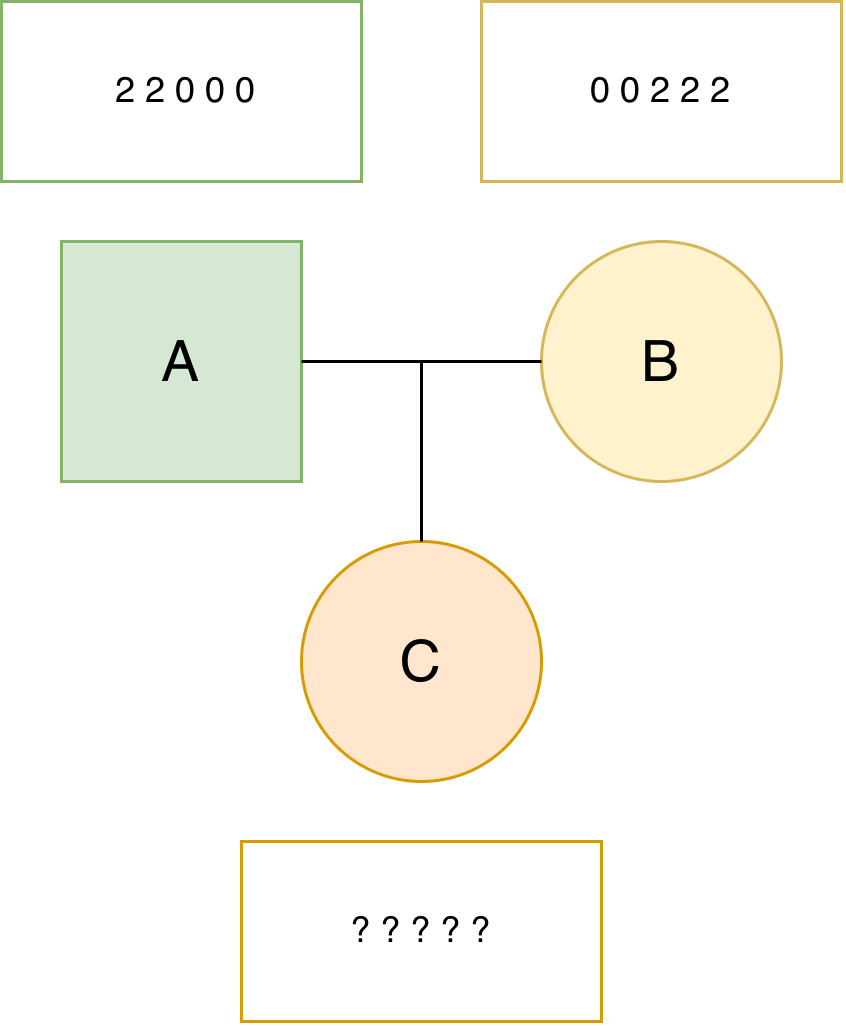
Our task is to estimate the haplotypes of all the individuals (we name this task “phasing”) and
genotypes of the progeny (we name this task “imputation”).
Since the two parents are fully homozygous and the progeny has no information,
you can easily solve this problem yourself and check your solution with AlphaPeel.
We first prepare a genotype input file:
A 2 2 0 0 0
B 0 0 2 2 2
C 9 9 9 9 9
And a pedigree file:
A 0 0
B 0 0
C A B
We named the two file as simple_genotype.txt and simple_pedigree.txt.
You can create the files yourself.
They are also available in the example/simple_example/ directory of the repository.
To use these files you have to change the working directory to the one holding the simple example:
cd simple_example
We perform the phasing and imputation with the following command:
AlphaPeel \
        -geno_file simple_genotype.txt \
        -ped_file simple_pedigree.txt \
        -method single \
        -geno -hap -out_file simple_output
Above we provided the two input files, asked for the single-locus method, and
requested the output of called genotypes and haplotypes,
with all the output filenames starting with simple_output.
If the run was successful, you should see the following output:
Reading in AlphaGenes format: simple_genotype.txt
Generating seg estimates
Cycle  0
Peeling Down, Generation 0
Peeling Down, Generation 1
Peeling Up, Generation 1
Peeling Up, Generation 0
Cycle  1
Peeling Down, Generation 0
Peeling Down, Generation 1
Peeling Up, Generation 1
Peeling Up, Generation 0
Cycle  2
Peeling Down, Generation 0
Peeling Down, Generation 1
Peeling Up, Generation 1
Peeling Up, Generation 0
Cycle  3
Peeling Down, Generation 0
Peeling Down, Generation 1
Peeling Up, Generation 1
Peeling Up, Generation 0
Cycle  4
Peeling Down, Generation 0
Peeling Down, Generation 1
Peeling Up, Generation 1
Peeling Up, Generation 0
And following output files:
simple_output.dosage.txt
simple_output.rec_prob.txt
- TODO: Let’s round up these thresholds to 0.3333333333333333 to 0.33, so 2 digits
This should be enough, I reckon, but happy to discuss!
simple_output.geno_0.3333333333333333.txt simple_output.seq_error_prob.txt simple_output.geno_error_prob.txt simple_output.hap_0.5.txt
The simple_output.hap_0.5.txt provides the called haplotypes:
A 1 1 0 0 0
A 1 1 0 0 0
B 0 0 1 1 1
B 0 0 1 1 1
C 1 1 0 0 0
C 0 0 1 1 1
As you can see, each of the parents has two identical haplotypes, in line with their fully homozygous genotypes. As such, the progeny could only inherit one kind of a haplotype from each of the parents, making this a very simple example.
- TODO: Let’s round up these thresholds to 0.3333333333333333 to 0.33, so 2 digits
This should be enough, I reckon, but happy to discuss!
The simple_output.geno_0.3333333333333333.txt provides the called genotypes:
A 2 2 0 0 0
B 0 0 2 2 2
C 1 1 1 1 1
Which are just the sum of the haplotype alleles of each individual.
For more information about how to use AlphaPeel, please see Usage.